House plans from a sentence
House plan generatorfurnished, to scale, in 3D
Say how many bedrooms, how big, what shape and what style, and get a furnished house plan drawn to scale. Change it in 2D, see it in 3D and walk through it, at no cost.
A house plan generator that hands you a plan you can change
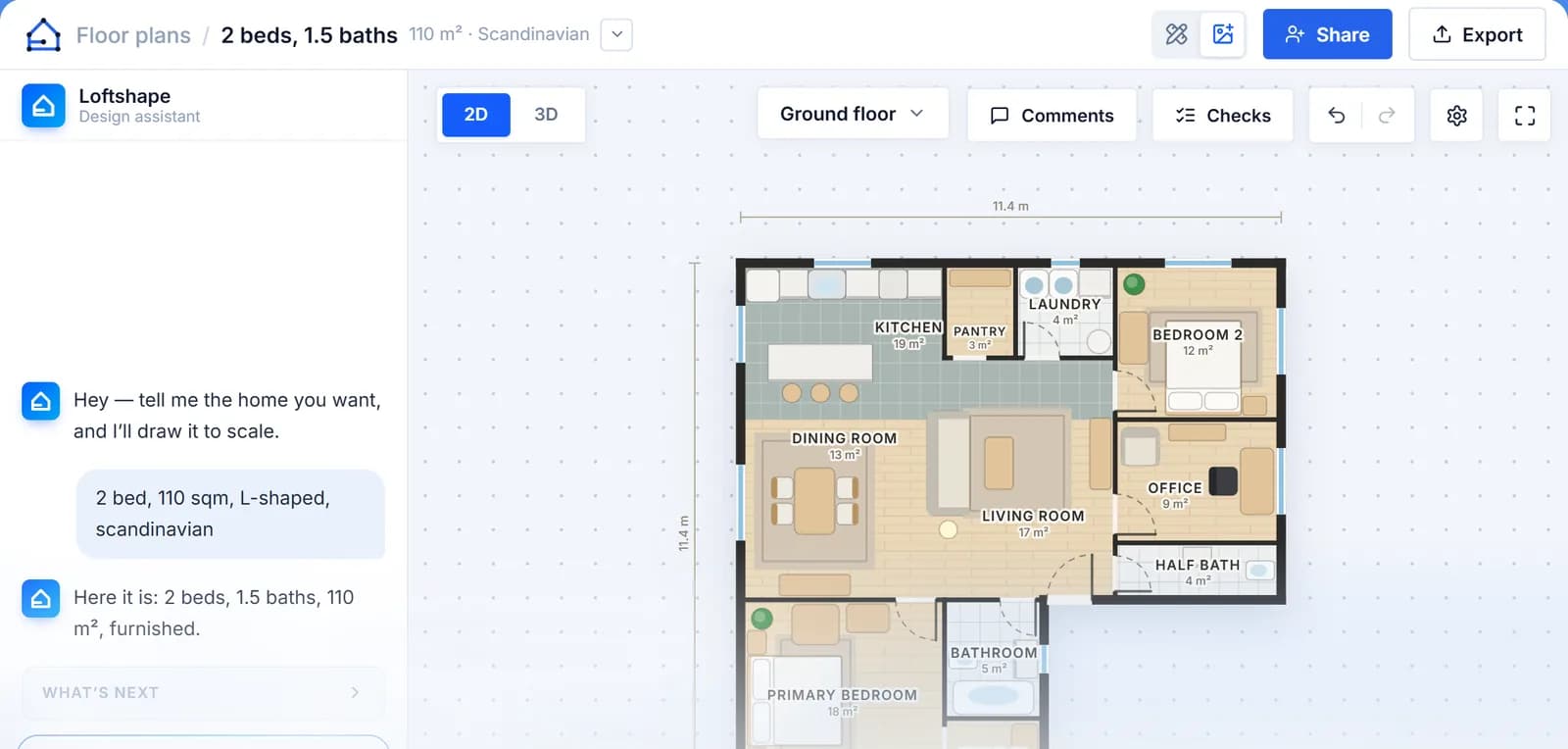
Type what the home should be, for example "three bedrooms, two bathrooms, an open kitchen, about 140 square metres, L-shaped, Scandinavian", and Loftshape draws it. The outside walls go down, the rooms are laid out and named, doors and windows are placed, and every room is furnished in the style you asked for. The plan is drawn in real centimetres with its overall size written on it, and you can work in metres or in feet.
The generator that draws it works by rules rather than by an AI model, which is why it is free on every plan and no card is asked for. A sentence that names the rooms or the size goes straight to it. For anything looser, such as a full design brief, "a family home on a narrow plot with a garage", or a change to the first draft, the AI assistant in the studio takes over. The assistant runs on credits: two for each message it answers.
What you get is a design drawing, a starting point for trying layouts and showing them to people. It is yours to edit wall by wall, it stands up in 3D beside the 2D plan, and it can be walked through. It is not a set of construction documents, and Loftshape does not check building codes, structure or engineering.
How it works
- 01
Describe the home
Bedrooms, bathrooms, size, footprint and interior style, in your own words or with the controls. Footprints include square, L-shape, T-shape, H-shape, courtyard, cross, stepped and offset.
- 02
Get the plan
The rooms are laid out to scale, the doors and windows placed, and each room furnished in the style you named. Ask for a garage, a back garden or a pool and the home is set on a plot with them.
- 03
Look at it in 3D
The same plan stands up in 3D beside the 2D one. Turn it, cut it open to see inside, or walk through it at eye height, room to room.
- 04
Make it yours
Move, resize or remove any wall, door, window or piece of furniture by hand, type a length to set it exactly, ask for another layout, or tell the assistant what to change in plain words.
What people use it for
Trying a layout before paying for one
Homeowners planning a new build put their wish list into a sentence and get something concrete to look at, change and talk about before they spend money on a designer’s time.
Early options for a client
Architects and builders at the sketching stage generate two or three quick options from a brief, walk the client through them in 3D, and then draw the chosen one properly in CAD.
Comparing shapes for one brief
The same rooms generated as an L-shape, a T-shape and a courtyard home show how the bedrooms, the kitchen and the light fall in each, side by side, without drawing any of them by hand.
A brief turned into something to react to
Interior designers turn a client’s list of rooms and a style into a furnished plan, so the first meeting is about a real layout rather than a description of one.
Questions
/01
Is the house plan generator free?
Yes. The plan generator, the 2D editor, the 3D view and Walkthrough cost nothing on every plan, and no card is asked for. The AI features, such as the chat assistant, photoreal renders and plans rebuilt from a picture, run on credits. A new workspace is given 30 credits once, and paid plans start at $15 a month with 200 credits.
/02
Is it an AI house plan generator?
Partly. The plan itself is drawn by a rule-based generator that lays the rooms out to scale and furnishes them without an AI model, so it costs nothing. The AI assistant in the studio reads open-ended requests and design briefs and edits the plan for you, and each message it answers uses two credits.
/03
Can I change the plan it draws?
Yes. Every wall, door, window and piece of furniture can be moved, resized or removed in the 2D editor, with snapping and typed lengths. You can also ask for another layout or tell the assistant what to change, and undo and restore points let you go back.
/04
Can it generate a house with more than one floor?
Yes. A home of several storeys is drawn floor by floor and joined by stairs. On the free plan a plan has one floor; Starter allows two, and Homeowner and above allow as many as the home has.
/05
Are the plans to scale?
Yes. Walls, rooms and furniture are drawn in real centimetres, the overall size is written on the plan, and you can work in metres or feet. Any wall can be set to an exact length by typing it.
/06
Can I export the house plan?
On a paid plan, plans export as PDF, and from the Homeowner plan also as DXF for opening in CAD software. On every plan you can share a plan with a client through a view-only link.
/07
Can I build or apply for a permit with a generated plan?
No. A generated plan is a design drawing for exploring and presenting a layout, not a construction document. Loftshape does not check building codes, structure or engineering, so a licensed architect or engineer is needed before anything is built or submitted.